

Summary: tracking and GA4 in 2026
Google Ads and Meta learn from the conversions you send them. If your tracking misses enquiries or sales, your campaigns steer on incomplete data and you pay too much per customer. In the Netherlands more than half of internet users limit cookies in their browser, and Safari keeps cookies set through JavaScript for 7 days at most. This whitepaper gives you a checklist of 12 checks for GA4, Consent Mode v2, server-side tracking and sending conversions back, with real figures and costs.
→ 56% limit cookies
of Dutch internet users changed their browser settings to limit cookies, against 36% across the EU (Eurostat, 2023).
→ 7 days
is the maximum lifetime of cookies set through JavaScript in Safari (WebKit).
→ 2 months
is the default retention of user data in GA4. Set it to 14 months (Google Analytics Help).
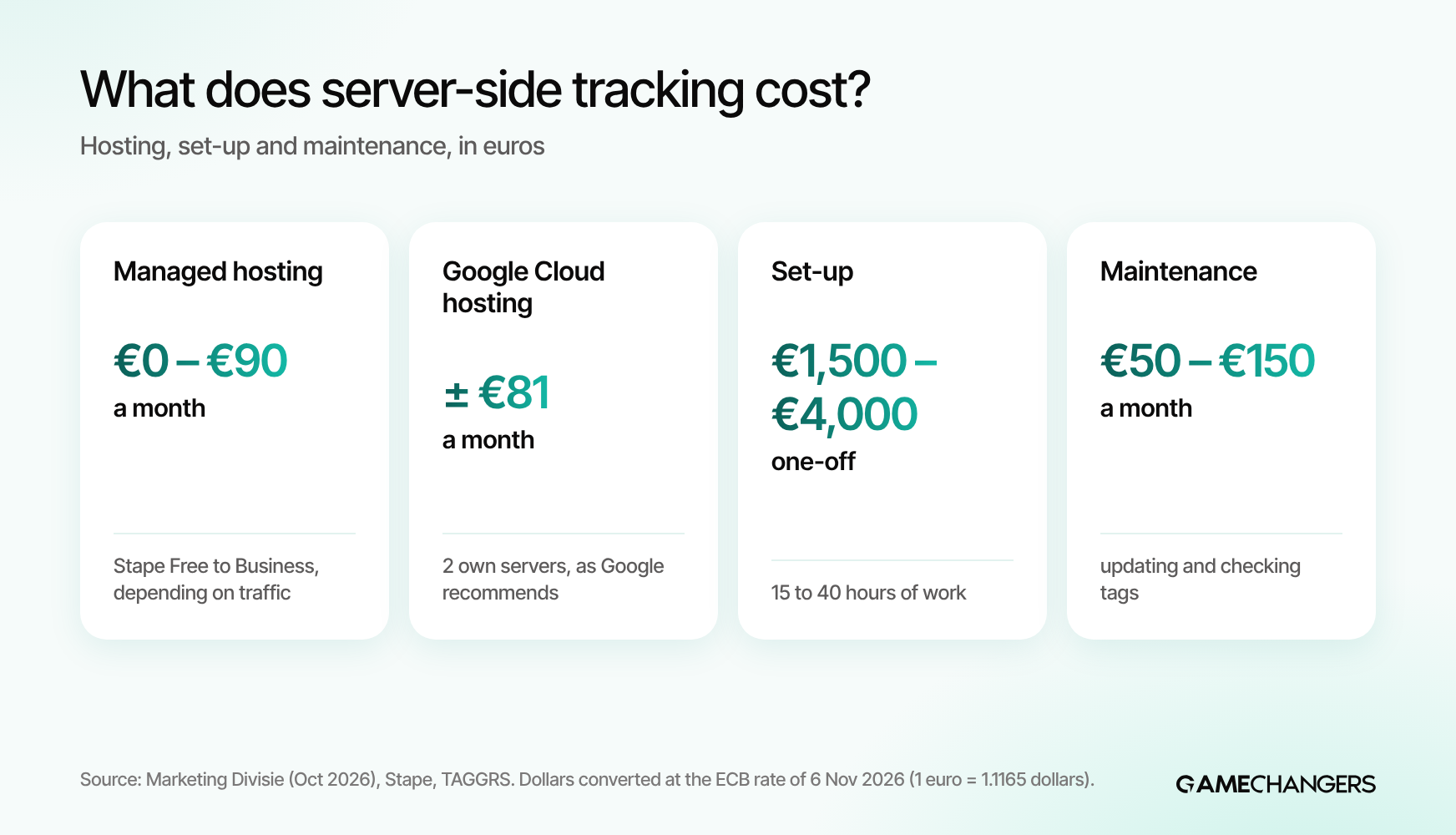
→ €18 to €90 a month
is what server-side tracking hosting costs for most small business websites, plus €1,500 to €4,000 one-off set-up (Marketing Divisie, October 2026).
→ 31% lower cost per purchase
at Rug expertise centrum, after Game-changers improved the conversion data sent to Google and Meta.
→ 3 out of 20 agencies
load their tags through their own subdomain, a sign of server-side tracking. That is what we found when we checked the websites of 20 Dutch marketing agencies.
Why tracking decides what your ads cost
Tracking decides what your ads cost, because Google Ads and Meta base their bids on the conversions they get back from your website. If the algorithm only sees part of your enquiries, it cannot tell which clicks are valuable. It then bids on the wrong people and your cost per customer goes up.
Meta writes that using the Conversions API alongside the pixel creates a more reliable connection that helps the ad system lower your cost per result (Meta Business Help, About Conversions API). Google says the same about enhanced conversions: you send extra, hashed customer data, so Google can match more conversions to your ads (Google Ads Help, About enhanced conversions).
So tracking is not a technical side issue. It is the fuel of your campaigns. With the same ads and the same budget you can get better results, just by measuring better. At Rug expertise centrum the cost per purchase fell by 31% thanks to more accurate conversion data. More on that below.
Where you lose measurement data
You mainly lose measurement data in four places: the visitor's cookie choice, browser settings, software that blocks tracking and Safari's cookie rules.
→ 1. The cookie banner
If a visitor declines cookies, you may not set marketing cookies. That is the law, and it stays that way. The Dutch data protection authority, the Autoriteit Persoonsgegevens, checks whether websites ask for consent properly: declining must be as easy as accepting.
→ 2. Browser settings
In the Netherlands 56% of internet users changed their browser to limit cookies. Only Finland was higher, at 66% (Eurostat, 2023 figures).
→ 3. Software that blocks tracking
32% of Dutch internet users use software that limits tracking, such as an ad blocker. The EU average is 21% (Eurostat).
→ 4. Safari and other browsers
Safari caps cookies set through JavaScript, which is how most tags work, at 7 days (WebKit, Intelligent Tracking Prevention). If someone comes back after 8 days and buys, your tracking sees a new visitor.
You fix the first leak with a proper cookie banner and Consent Mode v2. You shrink the other three with first-party data: tags that run through your own domain and conversions you send back from your own server.

The GA4 checklist: 12 checks for reliable data
Go through these 12 checks in your own GA4, Google Tag Manager and ad accounts. Each check takes a few minutes. Fixing it sometimes takes longer.
GA4 basics
→ 1. Retention set to 14 months
GA4 keeps user data for 2 months by default. Set it to 14 months under Admin, Data settings, Data retention, or you cannot look further back in explorations (Google Analytics Help).
→ 2. Only real goals as key events
Only mark actions that make money as key events: a purchase, a quote request, a booked call. A click on "contact" or a page view is not a goal (Google Analytics Help, About key events).
→ 3. No duplicate tags
If GA4 sits both in Google Tag Manager and hard-coded in your site, you count everything twice. Check it with Tag Assistant or Tag Manager preview mode.
→ 4. A value on every conversion
Send the real order value with a purchase, and a fixed estimate of what an enquiry is worth with an enquiry. Without a value Google cannot steer on revenue.
→ 5. Payment and booking domains
Does your payment or booking run through another domain? Turn on cross-domain measurement and exclude the payment provider as a referrer. Otherwise every sale looks like it came from the payment provider.
Consent and privacy
→ 6. A cookie banner that is right
Declining is as easy as accepting, nothing is pre-ticked, and consent can always be withdrawn (Autoriteit Persoonsgegevens).
→ 7. Consent Mode v2 switched on
Your cookie banner passes the choice to Google with the signals ad_storage, analytics_storage, ad_user_data and ad_personalization (Google Ads Help, About consent mode). More on this in the next chapter.
→ 8. Tags wait for consent
Check in your browser that marketing tags, such as the Meta pixel, only load after a "yes". Open your site in a private window, decline cookies and see which scripts still load.
Sending data back to your ads
→ 9. Google Ads linked, with enhanced conversions
Link GA4 to Google Ads and turn on enhanced conversions. Google then matches more conversions to your ads using hashed data, such as an email address (Google Ads Help).
→ 10. Meta pixel plus Conversions API, without double counting
Send conversions through the pixel and through the Conversions API, with the same event ID, so Meta counts them once (Meta Business Help, Deduplication).
→ 11. Offline results sent back
Does an enquiry become a customer later, after a call or a quote? Send that sale from your CRM back to Google Ads and Meta. Then your campaigns learn from customers, not from forms.
→ 12. Compare with your own records every month
Put the number of enquiries or orders in GA4, Google Ads and Meta next to your CRM or shop. A big gap is always a reason to check your tracking.

Consent Mode v2 and the cookie banner
Consent Mode v2 is how your cookie banner tells Google what a visitor chose. Since March 2024, advertisers who measure or target European visitors must pass these consent signals under Google's EU user consent policy. Without them you cannot properly use features such as remarketing audiences.
→ Basic mode
Google tags only load after consent. Visitors who decline are not measured at all.
→ Advanced mode
Google tags load straight away, but without consent they only send cookieless signals. Google uses them to model the gap in your data (Google Ads Help, About consent mode).
Which mode fits depends on your appetite for risk and your legal advice. What matters is that the banner itself is right. Consent Mode only passes a choice on. It does not fix a misleading banner.
Server-side tracking: what it is and when it pays off
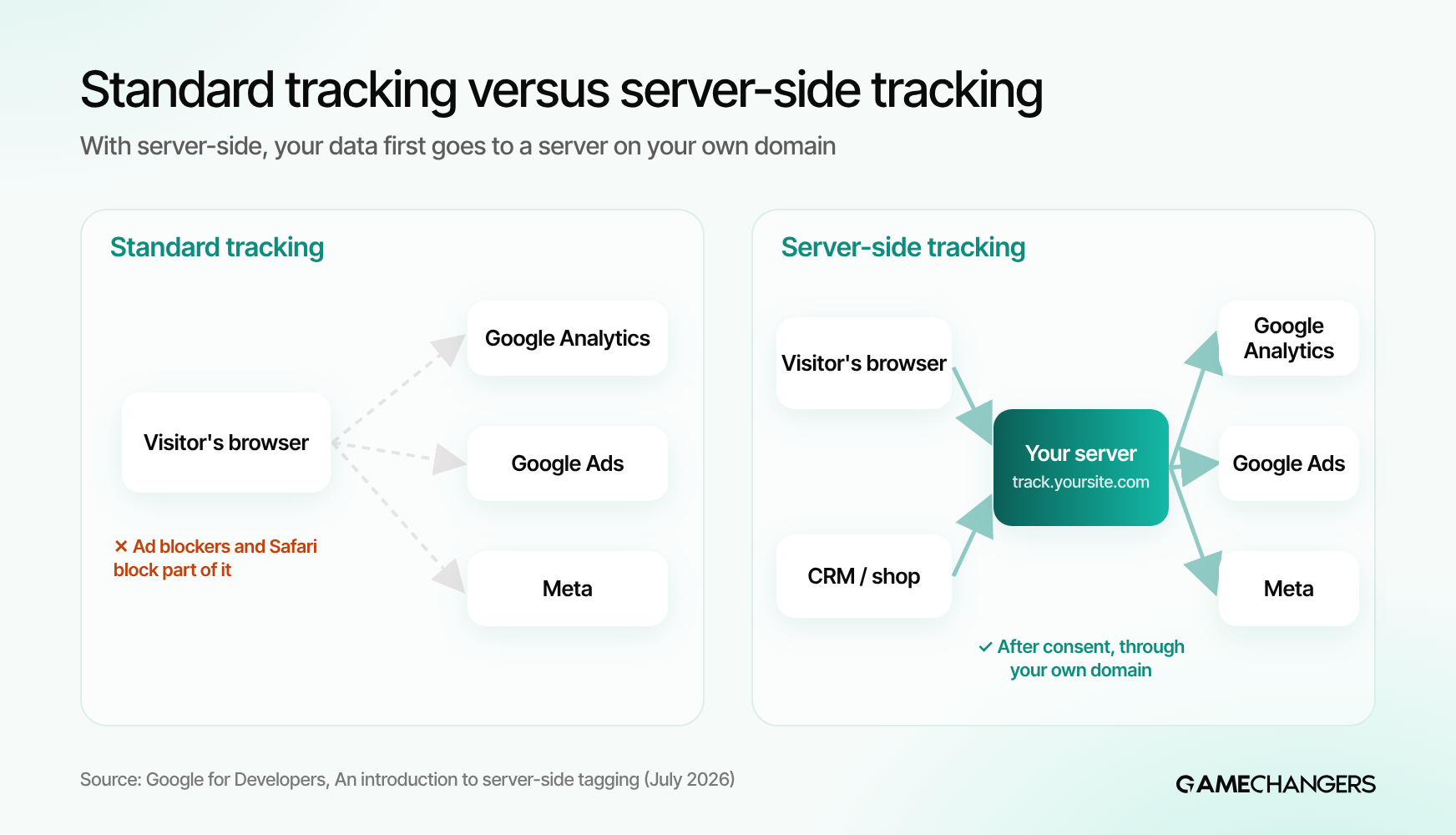
Server-side tracking means the browser first sends your measurement data to a server you control, usually on a subdomain of your own website. That server then passes the data on to Google Analytics, Google Ads and Meta. Google describes it as a server you control, where only you can see the data until you send it on (Google for Developers, Server-side tagging).
→ What it gives you
Cookies set by your own server are not hit by Safari's 7-day cap for JavaScript cookies. You load fewer scripts on your pages, and you decide which data goes to which platform (Google Tag Manager Help).
→ What it does not do
Server-side tracking is not a way around the cookie banner. Meta says this in so many words about the Conversions API (Meta). No consent means no marketing cookies, also through your own server.
What does server-side tracking cost? Costs are made up of hosting, one-off set-up and maintenance. All amounts in euros, dollars converted at the ECB rate of 6 November 2026 (1 euro = 1.1165 dollars, ECB).
Sources: Marketing Divisie, Server-side tracking kosten (29 October 2026) and TAGGRS, Server-side tracking costs. According to Marketing Divisie, a small website with 15,000 visits a month generates about 150,000 requests, so Stape Pro.
When does it pay off? Server-side tracking pays off if you advertise seriously on Google or Meta, have many visitors on Safari or iPhone, or want to control exactly what data you share. If you advertise little or your basics are not right yet, start with the checklist above first. Server-side builds on good foundations. It does not fix messy tracking.
Sending conversions back to Google Ads and Meta
The biggest effect on your ad costs does not come from nicer reports, but from better signals sent back to the ad platforms. These four connections deliver the most.
→ Enhanced conversions in Google Ads
With a purchase or enquiry, your tag sends a hashed email address or phone number. This lets Google match conversions that would otherwise be lost (Google Ads Help).
→ Meta Conversions API
Sends conversions from your server to Meta, alongside the pixel. Less affected by ad blockers and loading errors, and you can send later steps, such as a subscription or an in-store sale (Meta).
→ Deduplication
If you send the same purchase through the pixel and the server, give both the same event ID. Meta then counts it once (Meta).
→ Offline conversions from your CRM
An enquiry that becomes a customer three weeks later is your most important signal. Send that sale back with its value, and your campaigns learn which enquiries really become customers.
How this works for Google Ads in practice is in our blog on what Google Ads costs in the Netherlands. For Meta, read what Instagram ads cost.
Our research: how do 20 Dutch marketing agencies track their own site?
On 8 November 2026 we checked the homepage source code of 20 Dutch marketing agencies, the agencies we follow in our competitor analysis. We loaded each homepage without accepting cookies and looked for four visible signals. Tags that only load after consent are not visible this way, so an agency may use more than shown here.

What stood out:
→ Google Tag Manager is the standard
Three in four agencies load a Tag Manager container. It is also the basis for Consent Mode and server-side tracking.
→ Server-side is not yet a habit
Only 3 of the 20 visibly load their tags through their own subdomain: Dtch Digitals, Traffic Today and Whello. Of the 3 agencies that sell server-side tagging as a service, only 1 visibly uses it on its own homepage.
→ Consent Mode is often hidden
At 6 agencies you see the Consent Mode v2 signals straight in the code. At the others it may sit inside Tag Manager. So always check it in Tag Assistant, not just in the source code.
→ What this means for you
Even marketing agencies do not all set up tracking the same way. So always ask an agency to show you how it measures your conversions and sends them back.
“Many businesses think their tracking works because GA4 shows numbers. Only when we put the orders or enquiries from their own system next to Google Ads and Meta do you see the gap. So don't start with a new tool, start with one question: does the number of enquiries in your ad account match the number in your own records?”

What better tracking delivered for our clients
Three examples of Game-changers clients, with the figures from our Data & Tracking page.
→ Rug expertise centrum: 31% lower cost per purchase
Cookie tracking only showed fragments of the customer journey. We connected Meta and Google to product views, checkout and purchases, and sent verified revenue back. Result: 31% lower cost per purchase and 96% of orders linked to their marketing source.
→ Jaicob: 34% of revenue was attributed to the wrong place
Buyers of this SaaS software rarely converted after one touch. We brought Meta, YouTube and Google together in one funnel. It showed that a demo takes 6.7 touchpoints on average, and that 34% of revenue had been credited to the wrong channel.
→ Fjaere: 48% lower cost per active user
The app optimised for downloads, without seeing who actually used it. We linked the ad data to in-app behaviour. Result: over 400% more downloads and 48% lower cost per activated user.

Getting your tracking set up by Game-changers
Tracking at Game-changers is tailored work, not a fixed monthly fee. The price starts from €500 and depends on your set-up and goals. We first map your whole customer journey, then build tracking that connects your ads, website and CRM.
→ Free call and 8-hour analysis
We look at your current tracking, missing conversions and duplicate tags, and you get a report with concrete actions.
→ Server-side tracking and conversion APIs
Tracking through your own domain, with enhanced conversions for Google and the Conversions API for Meta.
→ Offline conversions
Calls, appointments, quotes and closed deals go back to your campaigns.
→ Senior team
You always talk to a senior partner or the founder, not a junior account manager.
→ Your accounts, your data
GA4, Tag Manager and your ad accounts stay yours.
Market prices: Marketing Divisie (October 2026). Agencies: own research, 8 November 2026.
See our Data & Tracking service or book a free call. Want to know what your ads cost first? Read what Google Ads costs in the Netherlands, or see how tracking works for online shops.
Frequently asked questions about tracking and GA4
What is server-side tracking?
With server-side tracking the browser first sends your measurement data to a server on your own domain. That server then passes the data on to Google Analytics, Google Ads and Meta. You measure more reliably and decide yourself which data you share.
Does a small business need server-side tracking?
Not always. If you advertise seriously on Google or Meta, it usually pays off. If you advertise little, first get your GA4 and Consent Mode basics right with the checklist in this whitepaper.
Can I track without cookie consent if I use server-side tracking?
No. Marketing cookies and following visitors need consent, also through your own server. Server-side tracking makes measurement more reliable within the consent you get.
What is Consent Mode v2?
Consent Mode v2 passes the choice from your cookie banner on to Google tags. Since March 2024 Google asks advertisers to send these signals for visitors from Europe.
Why do GA4, Google Ads and Meta show different numbers?
Each platform measures in its own way, with its own attribution rules and its own models for visitors without consent. Small gaps are normal. Compare them with your own records every month.
How long does GA4 keep my data?
By default 2 months for user data in explorations. You can extend it to 14 months under Admin, Data settings, Data retention.
What does tracking cost at Game-changers?
Tracking at Game-changers is tailored work, not a fixed monthly fee. The price starts from €500 and depends on your set-up and goals. You get the price after a free call and an 8-hour analysis.
Sources
→ Eurostat: Safer Internet Day, are you managing cookies?
6 February 2024, 2023 figures.
→ WebKit: Intelligent Tracking Prevention 2.1
Checked November 2026.
→ Google Analytics Help: Data retention
Checked November 2026.
→ Google Analytics Help: About key events
Checked November 2026.
→ Google Ads Help: About consent mode
Checked November 2026.
→ Google: EU user consent policy
Checked November 2026.
→ Google Ads Help: About enhanced conversions
Checked November 2026.
→ Google for Developers: An introduction to server-side tagging
Updated 30 July 2026.
→ Google Tag Manager Help: Client-side vs. server-side tagging
Checked November 2026.
→ Meta Business Help: About Conversions API
Checked November 2026.
→ Meta Business Help: Deduplication for Meta Pixel and Conversions API events
Checked November 2026.
→ Autoriteit Persoonsgegevens: Clear cookie banners (Dutch)
Checked November 2026.
→ Marketing Divisie: Server-side tracking kosten (Dutch)
29 October 2026.
→ TAGGRS: Server-side tracking costs
Checked November 2026.
→ ECB: euro to dollar exchange rate
6 November 2026: 1 euro = 1.1165 dollars.
→ Game-changers: Data & Tracking
Client results Rug expertise centrum, Jaicob and Fjaere, checked November 2026.
→ Game-changers own research
Homepage source code of 20 Dutch marketing agencies, 8 November 2026. Search volumes: Ahrefs, November 2026.
Over de auteur
About the author
Annefleur van Osta
Online marketing strateeg bij Game-changers. Schreef dit artikel en houdt de prijzen en bronnen actueel.
Online marketing strategist at Game-changers. Wrote this article and keeps the prices and sources up to date.